
 1/15
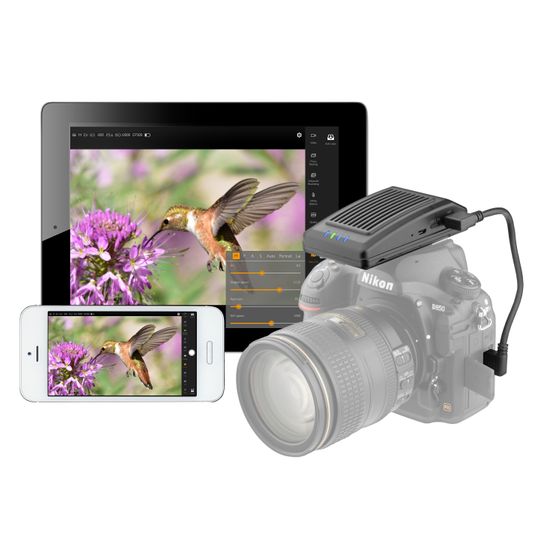
Extendá Plus with Lightroom and Capture One Wireless Tethering
MFR #LW-500-U
Availability: In-Stock
Key Features
- Wirelessly tether Lightroom, Capture One or your cameras native software.
- Wireless tethering works with over 500+ cameras
- Transfer speeds up to 10 MB/s
Overview
The Vello Extendá Plus LW-500-U is an updated version of the LW-500 Extendá app which provides additional capability to wirelessly tether to Lightroom, Capture One or your camera’s native application. This allows you to capture and transfer images straight to your favorite photo-editing software for instant processing on your computer. Wireless tethering works with over 500+ cameras, that support USB tethering and work with Lightroom or Capture One, from Canon, Nikon and Sony, as well as Fujifilm, Panasonic, Pentax and Olympus. It’s easy to set up your camera, connect through the fast ad-hoc Wi-Fi network it supplies and enjoy speeds up to 10 MB/s. Apply your common photo-editing presets, check focus and framing all while you’re shooting. And for Canon, Nikon and Sony users, you’ll still be able to use all the features from the native Extendá application. Note: Sony camera users, please check the Sony compatibility chart for a detailed list of supported features.
Features
Remotely Capture Photos and Video
Capture photos and video wirelessly from your mobile device or computer. This is ideal when you’re working with your camera in a hard-to-reach location or shooting untethered in a studio. The Extendá Plus makes it easy to take a photo and review it, change settings, and browse and share your images without wires.
Wireless Third-Party App Tethering
Thrid-party tethering allows you to wirelessly send your pictures to your favorite photo editing app like Lightroom, Capture One, or your camera’s native app, while you’re taking photos. Shoot with over 500 cameras from Canon, Nikon, Sony, Fujifilm, Panasonic, Pentax and Olympus, that support USB tethering, and streamline your workflow while using software with professional tools to edit the fine details.
Adjust Camera Settings
Change your camera’s exposure settings on the fly. Set your shutter speed, ISO, aperture, exposure compensation, white balance, and metering modes from your tablet or laptop.
Live View
See what the camera sees with live-view functionality. Use your mobile phone, tablet, or computer as a real-time monitor which shows your images larger and with more detail than the traditional LCD on your camera.
Touch Focus/Click-to-Focus
Enjoy focusing your camera with either a touch of your screen or a click of your mouse. The Extendá app makes it easy to select your image’s focus area. If you see something onscreen you want to focus on, you can choose that area without going to the camera to move the focus point.
Manual Focus
Ever disturb your camera while trying to manually focus on your subject? Without touching your camera, you can use the Extendá to manually adjust the focal plane forward or backward in precise increments from -3 to +3.
Auto View
The auto-view feature allows you to stream each shot to a mobile device or computer after it’s been taken. This prevents you from having to take the camera’s media card out and load the files onto your device. In practice, it means you can stream the images to a remote device for easy monitoring while on set.
Browse, Save, and Share
With the Extendá app, you can browse all the photos on your camera. From here, you can select one or multiple images, save them to your device, or share them. Save time by doing everything within the app.
Timed Exposure
Extendá has advanced settings for timed exposures. Set a delay timer for the countdown before taking a selfie. Use the intervalometer controls to shoot time-lapse photography—like shooting a full day’s traffic on a busy street. Or switch to bulb mode to capture as much light as possible for long exposures on starry nights.
Focus Stacking
Focus stacking offers the ability to capture an expanded depth of field in your pictures. Take a series of photos that can be layered and combined to create a single image with extended focus.
Bracketing
Bracketing can be used to generate a series of photos at varying exposures. You have the options to bracket by shutter speed, aperture, ISO, and EV (exposure compensation). Shooting variations in exposure is useful when working in difficult lighting. Bracketed images can also be layered and combined to create HDR (high dynamic range) images.
Grid
Compose your photos with balance. Employ the rule-of-thirds grid to achieve aesthetically pleasing compositions, whether it’s photo or video.
Wi-Fi Network
The Vello Extendá Plus supplies an independent Wi-Fi network using 802.11ac speeds and a 5.8 GHz frequency with an effective range up to 196.9 feet (60 m). Use it to establish a stable and fast connection on location and control your camera away from your subject.
USB Charging
You can charge other mobile devices with the USB port. This is ideal when you’re out in the field and need to give your phone or tablet a quick power boost.
Canon: 1Dx Mark II, 1D X, 5DS R*, 5DS*, 5D Mark IV, 5D Mark III, 5D Mark II, 6D Mark II*, 6D, 7D Mark II*, 7D, 80D, 70D, 60D, 50D, 77, T7i, T6s, T6i, T5i, T5, T4i, T3i, T3, T2i, T1i, SL2, and SL1 Nikon: D5*, D4S, D4, D3x, D3s, D3, D850*, D810*, D800*, D800e*, D500*, D750*, D610, D600, Df*, D7500*, D7200*, D7100*, D7000*, D90, D5600, D5500*, D5300*, D5200*, D5100*, D3400, D3300*, D3200*, Z 7II, Z 6II, Z 7, and Z 6 Sony: Most cameras are supported, however, not all functions of the Extendá are available. Please see the manufacturer's Sony compatibility chart for detailed compatibility information. * Use the USB cable that is supplied with your camera.
Vello Third-Party Tether Application Compatibility
Cameras that support USB tethering including Canon, Nikon, Sony, Fujifilm, Panasonic, Pentax and Olympus
UPC: 847628034549